
Modern booking software for ski and snowboard schools solves operational chaos during peak autumn and winter rushes by automating scheduling, instructor rosters, and student management. SkiPlanner provides a smart planning calendar and centralized dashboard that simplifies winter resort operations, streamlines online reservations, and maximizes seasonal academy revenue.
The Seasonal Operational Trap for Ski School Owners
Managing a winter sports academy with spreadsheets, legacy tools, or disconnected calendar systems creates friction during peak booking windows. As the autumn rush begins, ski school owners face distinct operational challenges:
- Instructor Scheduling Bottlenecks: Double-booking instructors or losing track of leave requests across private and group lessons during peak holiday weeks.
- Overwhelmed Front Desks: Manual processing of phone and walk-in reservations, leading to lost sales opportunities.
- Customer Friction: Outdated booking procedures that discourage tech-savvy travelers from completing reservations online.
- Capacity Tracking Overhead: Inability to track lesson capacity across slopes (baan) and instructor availability in real time across multiple peak periods.
Implementing dedicated ski software eliminates administrative bottlenecks and optimizes daily resort logistics.
Key Features to Evaluate in a Ski Academy Management System
Selecting the right ski school platform requires matching operational demands with specific software capabilities.
| Operational Feature | Legacy / Manual Process | Smart Ski Academy Platform | Business Impact |
|---|---|---|---|
| Schedule Management | Static spreadsheets or manual whiteboards | Dynamic Smart Planning Calendar with multi-view grid (slopes vs. hours) | Prevents double-bookings with smooth drag-and-drop adjustments. |
| Skill & Age Matching | Fixed lesson count or manual grouping | Estimated Point System & progress tracking per lesson | Automatically projects progress and flags level mismatches with soft restriction cautions. |
| Client & Family Bookings | Single-user registration email chains | Shareable Packages & Family Accounts | Parents manage children from one login, sharing a single credit pool or lesson package. |
| Analytics & Reporting | End-of-season manual ledger audits | Centralized Manager Dashboard with date-range financial reports | Real-time monitoring of open invoices, slot occupancy, and revenue streams. |
How SkiPlanner Solves the Autumn Booking Rush
SkiPlanner addresses the operational pain points of ski school management through an integrated digital system built specifically for snow sports platforms. Explore the full set of tools on our Features Page to see how automation simplifies resort logistics.
1. Smart Planning Calendar
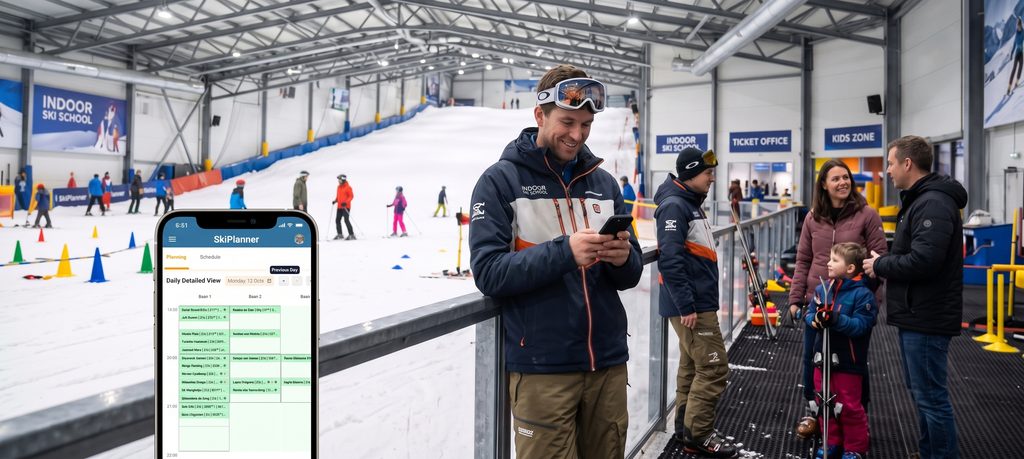
The foundation of SkiPlanner allows managers to configure empty slope schedules, operating hours, and recurring seasonal rules (e.g., “Slope A, Mon–Fri 9:00–13:00”). Visual indicators like euro icons (€) for unpaid invoices, cake icons for client birthdays, and color coding for sport types make managing peak demand effortless. Moving bookings requires no complex forms, simply drag and drop directly on the interactive calendar grid.
2. Flexible Multi-Mode Booking Engine
SkiPlanner’s multi-mode booking engine provides four distinct methods to handle any reservation scenario efficiently. Clients enjoy a seamless 24/7 online self-booking experience, while your team has access to versatile internal tools. Staff can utilize the standard booking flow with automatic rule checks for precise group balancing, place reservations directly onto the visual calendar for fast scheduling, or manage instant time shifts smoothly using simple drag-and-drop tools.
3. Automated Instructor Management & Notifications
Avoid the constant “When am I working?” inquiries. Instructors receive personal schedule pages, plus automated schedule updates emailed bi-weekly and monthly. Integrated automated notifications keep clients informed with reminders and booking updates without front-desk manual effort.
Operational Checklist for Implementing Ski Software
To prepare your academy for peak season, follow this step-by-step checklist to upgrade your management workflow:
- Structure Slopes & Opening Hours: Define slope availability (baan), operating hours, and sport types before opening winter booking windows.
- Centralize Instructor Records: Input instructor availability, certifications, and leave schedules into your management system to lock out unassignable times.
- Configure Level Point System: Set progress criteria (e.g., Level A = 1–5 points) so instructor post-lesson feedback automatically calculates projected progress for future package bookings.
- Enable Shareable Family Packages: Configure lesson packages allowing single-account multi-member scheduling to maximize average order value.
- Train Desk & Instructor Teams: Onboard administrative teams and instructors on drag-and-drop calendar shifts, mobile browser access, and real-time dashboard monitoring.
Trusted by Industry Professionals
“Niet alleen wij als bedrijf zijn er zeer blij mee, maar ook onze klant is zeer positief.”
Frequently Asked Questions (FAQ)
How does booking software for ski and snowboard schools handle peak-season surges?
Dedicated ski software automates slope capacity management, instructor assignments, and 24/7 online self-booking, eliminating scheduling conflicts and front-desk bottlenecks during peak periods.
How does level and age matching prevent mixed-skill classes?
SkiPlanner groups clients using exact age and skill limits. For multi-day bookings, the Estimated Point System predicts daily progression, while instructor feedback updates actual levels after each class. Any mismatch immediately triggers a red outline alert with soft restrictions, ensuring perfectly balanced classes.
Can families share a single lesson package or subscription?
Yes, family accounts allow a parent to link family members or friends to a single login, sharing a central pool of lesson credits across multiple family members.


